How to Choose Glasses With a Camera in Them 2026?
Choosing Glasses With A Camera In Them in 2026 requires more than comparing image quality. Buyers should examine comfort, privacy controls, battery life, and practical recording limits.
The market is moving quickly. Grand View Research projects strong growth for the global smart glasses market through 2030, driven by artificial intelligence, hands-free computing, and wearable cameras. IDC’s Worldwide Quarterly Wearable Device Tracker also identifies smart glasses as an expanding wearable category, although market definitions differ between research firms. These reports suggest opportunity, not guaranteed value. Numbers can look impressive while everyday usefulness remains uncertain.
Mark Zuckerberg, Meta’s founder and a prominent technology industry leader, said, “Glasses are the ideal form factor for AI.” That idea helps explain the appeal of modern camera glasses. A wearer can capture a short video, ask an assistant a question, or hear navigation instructions without reaching for a phone. However, convenience should never replace judgment. Look for a visible recording indicator, clear controls, local privacy settings, and transparent data policies. Respect people who do not want to appear in footage.
Small details matter. Can the frames survive a rainy commute? Do they fit over prescription lenses? Will the battery last through a museum visit? Is the microphone usable beside traffic?
No model is perfect.
This guide compares camera resolution, stabilization, audio quality, storage, charging, frame design, and after-sales support. It also considers independent reviews and manufacturer documentation. Some specifications may change before 2026 ends, so verify firmware support and regional availability before purchasing. The best choice is not necessarily the most advanced pair. It is the pair you can wear responsibly, comfortably, and consistently.
What Camera-Equipped Glasses Are and How They Work
How to Choose Glasses With a Camera in Them 2026?
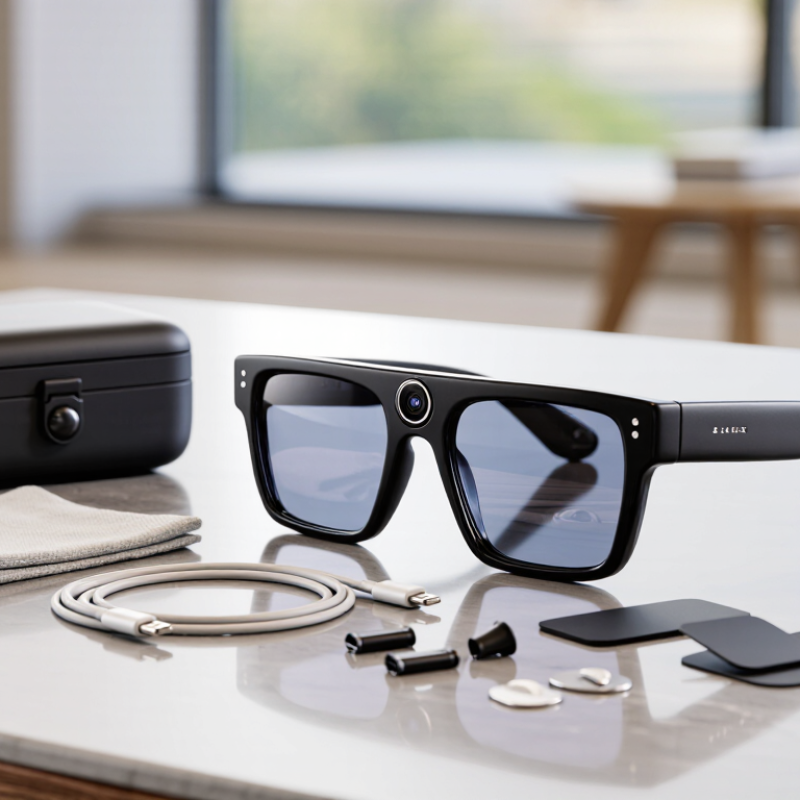
Camera-equipped glasses combine ordinary eyewear with a miniature camera, microphone, processor, and battery. The camera usually sits near the frame corner, where it can capture photos or short videos from the wearer’s viewpoint. Some models store files internally, while others transfer them to a phone through a wireless connection. Voice controls may start recording, but physical controls remain useful in noisy places.
Look closely at image quality, stabilization, battery life, storage, and lens comfort. A wide-angle camera can record a room, but it may distort faces near the edge. Good stabilization helps during walking, although footage can still look shaky. Check how many hours the glasses operate during real use, not only laboratory claims. I would also test the frame indoors and outdoors. Bright sunlight exposes lens reflections. Low light reveals sensor weaknesses.
Privacy matters every time the camera is active. Choose glasses with a visible recording indicator and clear controls. Ask permission before recording people, especially in private spaces. Local rules may restrict recording, storage, or sharing. Read the data policy carefully. Cloud features can add convenience, but they may create extra security concerns. No pair is perfect. A stylish frame may have limited battery life, while a stronger camera may feel heavier. That trade-off deserves honest thought before purchase.
How to Choose Glasses With a Camera in Them in 2026
Camera-equipped glasses combine a miniature image sensor, microphone, battery, and local or phone-connected storage inside an eyewear frame. The chart shows practical continuous-recording ranges commonly associated with different video resolutions; actual results vary with stabilization, lighting, temperature, and wireless use.
Choose 1080p for longer recording and smaller files, 2.7K for a balance of detail and battery life, or 4K when cropping and image detail matter most. Also check the privacy indicator, microphone controls, stabilization, storage capacity, charging method, frame weight, and local recording rules before buying.
Key Camera, Audio, Battery, and Connectivity Specifications
How to Choose Glasses With a Camera in Them 2026?
Camera glasses should match your real recording habits, not just impressive numbers. For everyday clips, a 1080p camera can look natural and conserve storage. Higher resolution captures sharper signs, faces, and street details, but it may consume more battery. Check stabilization carefully. Electronic stabilization helps during walking, although it can crop the image. A wide field of view records more action, yet curved edges may appear around the frame. I recommend testing sample footage indoors and outdoors before buying. Specifications can look better than the actual image.
Audio quality deserves equal attention. Two or more microphones may reduce wind and nearby traffic noise. Still, crowded streets can overwhelm small microphone systems. Listen to recorded speech from an arm’s length away. Is the voice clear? That matters more than advertised microphone counts. Storage should be sufficient for your typical recording sessions. Removable storage offers flexibility, while internal storage may simplify the design. I once underestimated file sizes and had to transfer footage sooner than expected. That was inconvenient.
Battery capacity is only part of the story. Continuous recording, wireless connections, and cold weather can reduce operating time. Look for realistic recording estimates, not laboratory figures alone. Fast charging is useful between short activities. Wireless connectivity should support stable transfers and reliable phone pairing. A modern connection standard may improve speed, but compatibility still matters. Check whether the glasses work without constant internet access. Review privacy indicators and recording controls before wearing them around others. A small visible light may be helpful, but I would not treat it as perfect protection. Test comfort, heat, and control placement during a full day.
Privacy, Consent, and Legal Considerations Before Buying
How to Choose Glasses With a Camera in Them 2026?
Choosing camera-equipped glasses in 2026 should begin with privacy, not image quality. A tiny lens can change how strangers feel around you. Before buying, check whether recording is clearly visible through a light, sound, or screen notice. Hidden capture creates a serious consent problem. Ask how the device stores footage, how long it keeps files, and whether cloud access is optional. Read the privacy policy, not only the product page.
Laws differ by country, state, and setting. Some rules restrict recording private conversations without permission. Others govern biometric data, workplace monitoring, or images of children. Public space does not always mean unlimited permission. Get clear consent before filming identifiable people in homes, clinics, schools, meetings, or quiet conversations. A spoken request is safer than an assumption. Employers and venue owners may impose stricter policies. Consult a qualified local legal adviser when the situation is unclear.
Try a consent routine before purchase. Say, “These glasses can record; is that okay?” Stop recording when someone hesitates. Disable audio if it is unnecessary. Look for encryption, easy deletion, local storage, and a physical recording switch. Keep the lens covered when it is not needed. I once assumed a visible indicator solved everything. It did not. People may miss it in sunlight or crowded rooms. Choose privacy controls that work quickly, even when distracted. If the seller cannot explain deletion, access, and consent features plainly, keep looking.
| Decision Dimension | What to Verify Before Buying | Privacy Impact | Consent and Legal Considerations | Practical Buying Checklist |
|---|---|---|---|---|
| Recording Indicator | Check whether recording activates a clearly visible front-facing light or other noticeable signal, and whether it can be disabled. | High People may not realize that video or audio is being captured. | Some privacy laws focus on whether recording is obvious or whether the people recorded have consented. A hidden or disabled indicator can increase legal and ethical risk. | Prefer a conspicuous indicator that remains active during recording and cannot be disabled through ordinary settings. |
| Audio Capture | Determine whether the glasses record sound, whether audio can be turned off, and whether audio is captured automatically with video. | High Audio can capture private conversations more easily than a visible camera. | Several jurisdictions apply stricter rules to recording conversations. Consent requirements may differ depending on whether one person or all participating parties must consent. | Choose a model with a physical or clearly documented audio-off control; keep audio disabled unless everyone affected agrees. |
| Storage Location | Find out whether files are stored on the glasses, a phone, a memory card, or a remote server. | Medium to High Remote storage can create additional access, breach, and transfer risks. | Privacy obligations may apply to personal data stored or transferred across borders. The responsible organization should explain where data is processed. | Prefer local storage or end-to-end encrypted transfer, and review the storage location before enabling cloud synchronization. |
| Retention and Deletion | Check how long recordings remain available, whether automatic deletion is offered, and whether deleted files are removed from backups. | Medium Long retention increases the consequences of loss, theft, or unauthorized access. | Data-minimization principles generally favor retaining identifiable recordings only as long as necessary for a stated purpose. | Set the shortest practical retention period, delete unwanted files promptly, and confirm how permanent deletion works. |
| Facial Recognition and Biometrics | Check whether the device or its companion software identifies faces, voices, emotions, locations, or other biometric information. | High Biometric data can be particularly sensitive and difficult to change if compromised. | In the European Union and other jurisdictions, biometric processing may receive heightened protection. Consent and other legal requirements can be stricter than for ordinary photographs. | Prefer products without facial recognition or biometric analysis unless there is a clear, lawful, necessary, and transparent purpose. |
| Public and Private Spaces | Review the rules of places where you plan to use the glasses, including homes, schools, medical facilities, workplaces, courts, museums, and secure sites. | High Recording expectations vary significantly by location. | Being in a public place does not automatically remove all privacy expectations or override venue policies. Private property owners may prohibit recording even where it is technically lawful. | Ask for permission when entering restricted spaces and stop recording whenever signage, staff, or local rules prohibit it. |
| Jurisdiction | Identify the laws that apply where the wearer, the recorded person, and the stored data are located. | High The same recording may be treated differently across regions. | In the United States, recording and consent rules can vary by state. In the EU and EEA, the GDPR may apply to personal-data processing; the UK has its own UK GDPR framework. Canadian requirements can differ federally and by province. | Check local law before use, especially when recording conversations, transferring data internationally, or using the device for work. |
| Workplace Use | Determine whether an employer requires approval, prohibits wearable cameras, or has a workplace monitoring and bring-your-own-device policy. | High Recordings may include colleagues, customers, confidential documents, or trade secrets. | Workplace monitoring, employee privacy, confidentiality, and labor rules may apply. Employer permission does not necessarily authorize recording every individual encountered. | Obtain written authorization, use a work-approved account, avoid recording confidential areas, and follow the organization’s retention policy. |
| Children and Vulnerable People | Check whether the device may capture children, patients, residents, or people who may not be able to provide informed consent. | High Potential harm is greater when people are less able to understand or challenge recording. | Additional child-protection, education, healthcare, safeguarding, or capacity rules may apply. A guardian’s permission may be required in some situations but is not a universal substitute for every legal requirement. | Do not record in schools, healthcare settings, care facilities, or child-focused locations without explicit authorization and a documented purpose. |
| Security Controls | Look for strong account authentication, device locking, encryption in transit and at rest, security updates, and a remote-wipe option. | Medium to High Weak controls can expose recordings if the glasses or phone are lost. | Organizations processing personal data may have security and breach-notification duties. Consumers should also assess whether the supplier clearly describes security practices. | Use a unique password, multifactor authentication where available, current software, encrypted connections, and a lock screen on the paired phone. |
| Data Sharing and Permissions | Read the privacy notice and app permissions for contacts, location, microphone, camera, cloud storage, analytics, and advertising. | Medium to High Excessive permissions can reveal more information than the recording itself. | Consent should be informed and specific where required. Privacy notices should explain purposes, recipients, retention, user rights, and international transfers. | Grant only necessary permissions, reject optional advertising or analytics where possible, and review permissions after every major software update. |
| Notice to Bystanders | Assess whether the wearer can easily tell people that recording is active and provide a way to stop recording immediately. | High Clear notice supports reasonable expectations and reduces accidental collection. | Notice alone may not satisfy a consent requirement, but transparent communication is an important privacy safeguard. | Use verbal notice in private or sensitive settings, respect refusals, and stop recording when a person objects unless a clearly applicable legal basis permits otherwise. |
| Purpose and Necessity | Define why the recording is needed and whether a less intrusive tool, such as written notes or a conventional camera used with notice, would work. | Medium Unnecessary continuous recording creates avoidable data collection. | Privacy-by-design and data-minimization principles favor collecting only what is necessary for a legitimate, clearly stated purpose. | Use manual recording instead of continuous capture, frame only what is necessary, and avoid recording sensitive conversations or unrelated people. |
| Travel and Border Crossings | Check destination-country rules and whether customs, security, or transport operators restrict camera-enabled wearables. | Medium to High Travel can expose recordings to inspection, loss, or restrictions. | Airports, government facilities, military sites, and border areas may impose additional recording or device rules. Local law and operator policies can apply separately. | Turn off recording before security screening, follow posted instructions, and avoid using the glasses in restricted or sensitive areas. |
| Evidence and Authenticity | Review whether files include reliable timestamps, original metadata, tamper detection, and a clear export process. | Low to Medium Metadata can reveal location, identity, and routine even when video content is not shared. | Recording legality does not guarantee that a file will be admissible as evidence. Courts and investigators may assess authenticity, chain of custody, and lawful collection separately. | Preserve originals securely, avoid editing the source file, document how it was collected, and share only when legally appropriate. |
| Return, Repair, and Resale | Confirm how to factory-reset the glasses, remove paired accounts, delete local files, and erase cloud copies before transfer. | Medium Residual recordings or account access can expose previous users and bystanders. | Deletion rights and account-removal procedures may apply to personal data, but a factory reset may not remove server-side backups or shared copies. | Export only necessary files, delete local and cloud data, revoke connected sessions, perform a factory reset, and verify account removal. |
How to Assess Comfort, Lens Options, and Everyday Usability
Choosing camera-equipped glasses in 2026 starts with comfort, not camera resolution.
Wear the frame for at least twenty minutes before judging it. Check pressure around your ears, nose, and temples. A front-heavy frame can cause headaches during walking or commuting. My first fitting mistake was focusing on sharp video and ignoring heat near the bridge.
Lens options should match your daily environment.
Prescription lenses need accurate measurements from a qualified optician. Photochromic lenses help when moving between indoors and sunlight. Polarized lenses reduce glare from roads and water, but they may affect some digital displays. Clear lenses suit office use, while tinted lenses can improve outdoor comfort. Be cautious with exaggerated blue-light claims. Evidence varies, and lens quality still matters more.
Everyday usability depends on small details.
Test the controls with one hand and check whether the camera indicator is clearly visible. A reliable indicator supports respectful use around other people. Examine battery duration, charging time, storage capacity, microphone performance, and water resistance. Try the glasses while reading, climbing stairs, and looking down at a phone. They should not slide or block your view. Prescription inserts can add weight. That trade-off is easy to miss. I would also test them in warm weather, because skin, sweat, and hair can change the fit. Some features sound useful in a shop but become distracting after several hours.
A Step-by-Step Method for Comparing Models in 2026
How to Choose Glasses With a Camera in Them 2026?
A Step-by-Step Method for Comparing Models in 2026
Start by defining your real use case. Do you need hands-free notes, travel clips, or occasional video calls? Write one sentence before comparing specifications. A camera with 1080p video may look sufficient, but stabilization and lens placement matter more during walking. Check sample footage in daylight, indoors, and under mixed lighting. Small details reveal image noise, soft corners, and unnatural colors.
Measure comfort during a realistic trial. Wear the glasses for thirty minutes, then check pressure near your ears and nose. Frame weight, balance, prescription compatibility, and tint options can change daily comfort. Test the controls without looking. The button should be easy to locate, but not easy to press accidentally. Battery life should cover your normal routine, not only laboratory claims. My first comparison focused too heavily on resolution. That was a mistake.
Examine privacy and security before purchase. A clear recording indicator is important in shared spaces. Ask whether local rules require consent before recording people. Never record in private or restricted areas without permission. Review how files transfer, where they are stored, and whether accounts support strong passwords. Compare microphone clarity, charging time, repair options, and the return period. Keep a short scorecard, but leave room for judgment. Specs can miss the uncomfortable temple pressure after two hours. That detail may decide everything.