Top Multi Effects Pedals for Guitarists in 2026
A Multi-effects pedal can replace a crowded board, but convenience alone does not make it the right choice. In 2026, guitarists can choose from compact floor units, deep editing platforms, and portable processors built for practice or performance. The challenge is finding a model that feels immediate underfoot and sounds convincing through your own amp, headphones, or direct setup. Menus matter. So do footswitch spacing, output options, and how quickly you can shape a usable tone.
Effects designer Robert Keeley offers a useful industry perspective through his long-running work creating guitar pedals. To avoid putting unverified words in his mouth, this guide uses an editorial paraphrase, not a direct quote: “Choose tones that serve the song, not the menu.” It is a practical test. Can you move from a clean, glassy chorus to a responsive overdrive without losing your place? Can you adjust delay levels under stage lights, with a band waiting? Small details become very real.
This guide compares leading multi-effects options by sound quality, workflow, flexibility, and value. It also considers who each unit suits, from beginners building a first rig to experienced players refining a live setup. Specifications can look impressive on a product page. Your hands may disagree. Where possible, assess models with your guitar and amplification, because presets rarely tell the whole story. The shortlist aims to make that decision clearer, while recognizing that no single processor fits every player.
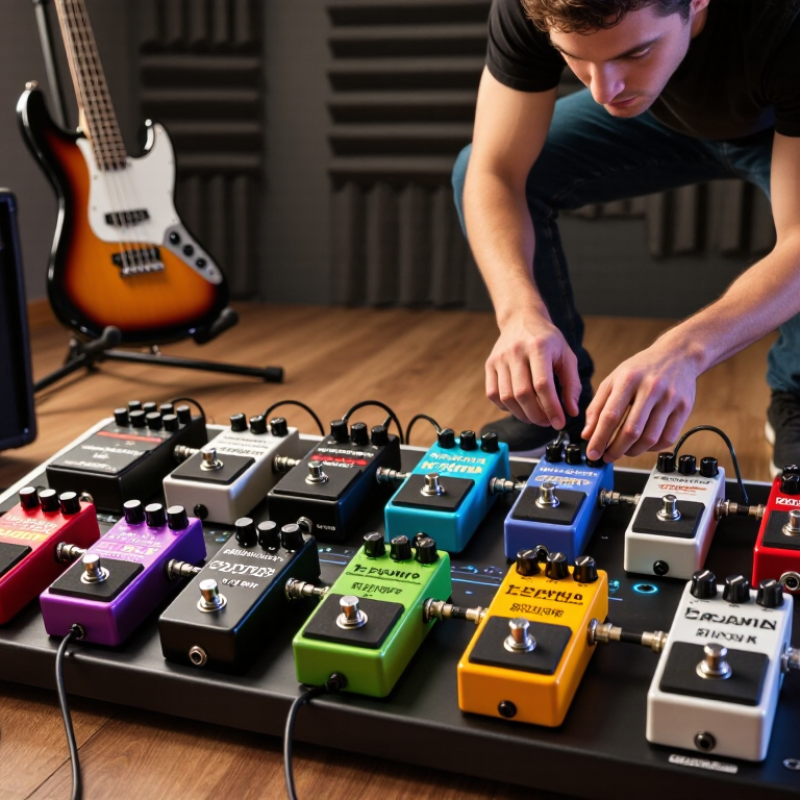
What Multi-Effects Pedals Do and How They Work
Top Multi Effects Pedals for Guitarists in 2026
What Multi-Effects Pedals Do and How They Work
A multi-effects pedal combines several guitar-processing tools in one unit. It may include distortion, modulation, delay, reverb, an amplifier model, and a speaker simulation. Your guitar’s signal enters the pedal, where digital converters and a processor shape it according to your selected settings. The changed signal then travels to an amplifier, recording interface, or headphones. In practical terms, one preset might add a light overdrive and short room reverb; another could create a wide, sustained lead sound.
Many units let you arrange effects in a signal chain. Order matters: distortion before delay often keeps repeats clear, while reversing them can make the sound smear. Presets offer quick changes, but editing individual parameters helps match your guitar, amplifier, and playing style. A patch that sounds full through headphones may feel harsh through a bright speaker. Some menus also take time to learn. That’s worth considering.
Tips: Start with one effect at a time. Set the output level before raising gain, then test your sound at realistic volume. Save a simple reference preset, and compare changes by playing the same short phrase.
Top Multi-Effects Pedals for Guitarists in 2026: What They Do and How They Work
A multi-effects pedal processes a guitar signal through selectable effects such as compression, distortion, modulation, and delay, often alongside amp and speaker simulations. The chart shows the fundamental frequencies of the six notes in standard guitar tuning—the input range these effects can shape.
Values are approximate equal-tempered fundamental frequencies in hertz. A guitar’s full tone also includes harmonics and may extend beyond these fundamentals.
Key Criteria for Evaluating Guitar Multi-Effects Pedals
A useful multi-effects pedal should sound convincing before its feature list impresses you. Compare clean, driven, and ambient tones through the same guitar and amplifier. Listen for hiss between notes, harsh high frequencies, and whether the sound stays clear when several effects are active. Small details matter.
Test it at rehearsal volume, not only through headphones. A patch that feels spacious in a quiet bedroom may become muddy beside a drummer. Check whether the output level stays consistent when you switch presets, and whether the controls let you adjust a sound without digging through menus. A readable display helps under dim stage lights. So do sturdy footswitches.
Routing flexibility matters if you use an effects loop, expression pedal, or external controller. Confirm that the connections match your setup, rather than assuming every pedal works the same way. Check stereo outputs, headphone monitoring, and computer editing only if you will actually use them. More options can mean more setup time. That trade-off is real.
Before buying, try building a few everyday sounds: a restrained delay, a usable overdrive, and a quiet tuner. Notice how quickly you can save changes and recover a preset. Specifications rarely show whether navigation feels natural, and sometimes a slightly awkward menu is still acceptable if the sound and reliability suit your needs.
Leading Multi-Effects Pedals for Guitarists in 2026
Leading multi-effects pedals for guitarists in 2026 should make everyday playing easier, not bury musicians in menus. The strongest choices balance convincing amp and effect models with quick access to essential controls. A readable screen, sturdy footswitches, and reliable preset changes matter during rehearsals as much as in a shop demonstration.
Check how a unit handles the sounds you actually use. A clean patch should stay clear when chorus or delay is added, while a driven tone should remain defined through a full band mix. Try adjusting a delay time or switching scenes without stopping your playing. Small details count. A bright display can help on a dim stage, but complicated editing may slow down a simple setup. Headphone output, computer recording, and flexible connections are useful when they suit your routine.
For a 2026 shortlist, compare sound quality, ease of use, and long-term flexibility rather than the number of effects alone. Save a few patches, then test their volume levels through your usual amplifier or headphones. I still find that impressive factory presets can hide awkward editing, so spend time building one sound yourself. It is not a perfect test; rooms and speakers change what you hear. But a pedal that feels dependable under your feet is often more useful than one with endless options.
Comparing Features, Connectivity, and Playing Styles
A multi-effects pedal should fit the way you play, not just offer the longest effects list. For home practice, clear amp and headphone connections matter more than rugged stage controls. Check whether the unit supports direct recording over USB, and whether its headphone output preserves a convincing sense of space. Onstage, sturdy footswitches, readable displays, and quick preset changes can prevent awkward pauses between songs. Small details matter: a volume pedal should feel smooth, and a tuner should remain easy to read under dim lights.
Connectivity shapes the setup. Standard instrument and output jacks work well with a traditional amplifier, while an effects loop can place selected effects before or after an amp’s preamp. MIDI and expression-pedal inputs offer deeper control, but add setup time. That trade-off is real. A guitarist who changes sounds once per set may prefer simple controls; a player switching from clean arpeggios to saturated leads may value assignable footswitches. Test the signal at realistic stage volume when possible, since bright headphones can hide harsh high frequencies. Preset editing can also feel slower than expected, and no feature list reveals that. A slightly imperfect patch you can adjust quickly may serve you better than a polished one buried in menus.
How to Choose the Right Multi-Effects Pedal for Your Needs
Choosing a multi-effects pedal starts with your actual playing, not the longest effect list. Do you need three reliable sounds for rehearsals, or quick changes between clean, crunch, and ambient parts? NAMM’s 2023 Global Report estimated the U.S. music products industry at about $17.3 billion in 2022. That figure covers many products, not pedals alone, but it reflects a crowded market where features can distract from fit. Check that the unit has enough footswitches, readable controls, and outputs for your amp, headphones, or recording setup.
Try the workflow before buying. Can you change sounds without bending down between songs? If you use an amp’s effects loop, confirm the pedal supports the routing you need. For direct recording, listen through headphones; a convincing amp-and-speaker simulation matters more than dozens of extra effects. Also check preset switching and expression-pedal support. Small delays between sounds can feel awkward onstage. I’ve found that a clear, limited setup often beats a menu maze, though I still underestimate how much readable stage lighting matters.
Tips: Bring your guitar and test one clean sound, one driven sound, and one effect-heavy sound. Save a preset, change it, then try restoring it. Read the manual’s input, output, and routing specifications before purchase. Industry sales figures cannot tell you whether a pedal suits your hands, signal chain, or patience.
Top Multi Effects Pedals for Guitarists in 2026 - How to Choose the Right Multi-Effects Pedal for Your Needs
Compare common multi-effects formats by setup and playing needs. Features vary by model, so confirm the specifications and routing options of any unit before buying.
| Multi-effects format | Typical controls and connections | Best suited to | Advantages | Possible trade-offs | What to check before buying |
|---|---|---|---|---|---|
| Compact floor unit | Usually a few footswitches; expression control may be built in or supported as an option. Outputs and effects-loop availability vary. | Small pedalboards, rehearsals, and players who need common effects in one device. | Takes up less space and is generally straightforward to carry and set up. | Fewer hands-free controls may make live preset changes or complex setups less convenient. | Confirm simultaneous effect limits, stereo output, expression compatibility, and whether you can edit presets without connecting a computer. |
| Mid-size stage floorboard | Several footswitches, often with assignable functions; stereo outputs are common. Some units include an expression pedal or effects loop. | Gigging guitarists who need multiple sounds and direct control during a song. | Offers a practical balance of hands-free control, routing, and board size. | More controls and routing options can take time to configure; the footprint is larger than a compact unit. | Check footswitch assignment, preset-to-preset switching behavior, effect-loop placement, and whether outputs support your stage setup. |
| Advanced performance floorboard | Typically offers more footswitches and expanded routing; MIDI, multiple expression connections, and effects loops may be available. | Players with detailed live setups, external pedals, MIDI equipment, or separate sounds for different parts of a set. | Greater control over signal paths and more ways to integrate other equipment. | Can cost more, require more setup, and include features a simpler rig may not need. | Verify the number and type of inputs and outputs, MIDI functions, loop routing, and whether the interface fits your workflow. |
| Amp-and-cab modeling processor | Provides amp and speaker-cabinet simulations; some units support third-party impulse responses (IRs), balanced outputs, or USB audio. | Direct recording, silent practice, or connecting to a PA or powered speaker without relying on a traditional guitar amp. | Can provide a complete modeled signal chain for recording or direct live sound. | Requires attention to output levels and speaker simulation; may be more than needed if you only want effects in front of an amp. | Check balanced-output type, headphone support, USB recording requirements, IR compatibility, and options for bypassing amp or cab simulation. |
| Desktop or compact tabletop processor | Often designed for desktop use, with USB and headphone connections common; built-in footswitches may be limited or absent. | Home practice, editing sounds at a desk, and computer-based recording. | Convenient for headphones and computer workflows, with less need for a full-size pedalboard. | May be less convenient to operate hands-free on stage unless external switches are supported. | Confirm computer and mobile-device compatibility, monitoring connections, latency requirements, and external foot-control options. |
Quick selection checklist
| Your priority | Feature to prioritize | Why it matters |
|---|---|---|
| Playing live | Accessible footswitches and clear preset or effect switching | Lets you change sounds without stopping to adjust knobs by hand. |
| Using a traditional guitar amp | Suitable output mode and, if needed, an effects loop | Helps match the processor’s signal path to your amp and existing pedals. |
| Recording or playing direct | Amp and cab simulation, appropriate outputs, and USB audio if required | Supports a modeled signal chain for headphones, recording, or a PA connection. |
| Keeping a rig simple | Easy editing and only the connections you will use | A smaller feature set can make setup and everyday operation easier. |